
Private Online Therapy: 7 Practical, Safe Choices
Quick answer: Private online therapy can be more workable by choosing the quietest available space, using headphones, silencing notifications, checking device security, and making a backup plan for interruptions. Privacy is shared: a therapy practice uses clinical privacy safeguards, while the client controls things like who is nearby, what device is used, and whether others can hear the session. Greene Psychology Group’s online therapy in North Carolina is for clients who are physically in the state during the session, and no home, workplace, or public setting can promise perfect privacy.
If preparing for teletherapy feels stressful, it can help to think less in terms of finding a “perfect” room and more in terms of reducing risk. A closed door, a charged personal device, a stable connection, a plan for children or pets, and a phrase like “I have a private appointment” can go a long way. If privacy changes during the session, tell the therapist, pause, move, or ask to shift the conversation.
What private online therapy does and does not mean
Private online therapy includes two related but different ideas: clinical confidentiality and physical privacy. Clinical confidentiality is about how health information is handled by the provider, within legal and ethical limits. Physical privacy is about whether another person, device, employer, or shared screen can see or hear what is happening nearby.
HIPAA is part of the clinical privacy picture. The U.S. Department of Health and Human Services explains that HIPAA helps keep paper and digital medical histories private, including information shared during telehealth visits, on its HIPAA information for individuals page. That protection matters, but it does not make a bedroom, office, car, or shared Wi-Fi automatically private.
For example, HIPAA does not stop a roommate from walking into the kitchen while a session is on video. It does not stop message previews from appearing on a shared tablet. It does not make an employer-managed laptop private from workplace policies. It also does not mean unencrypted email or a website contact form is the same as a designated telehealth platform.
A helpful way to prepare is to ask: “What can the practice protect, and what needs to be managed on the client’s end?” Teletherapy privacy works best when both sides are clear about limits. A therapist can talk through privacy concerns before sensitive topics come up, and the conversation can slow down if another person may be able to hear.
7 practical choices that make sessions safer and easier
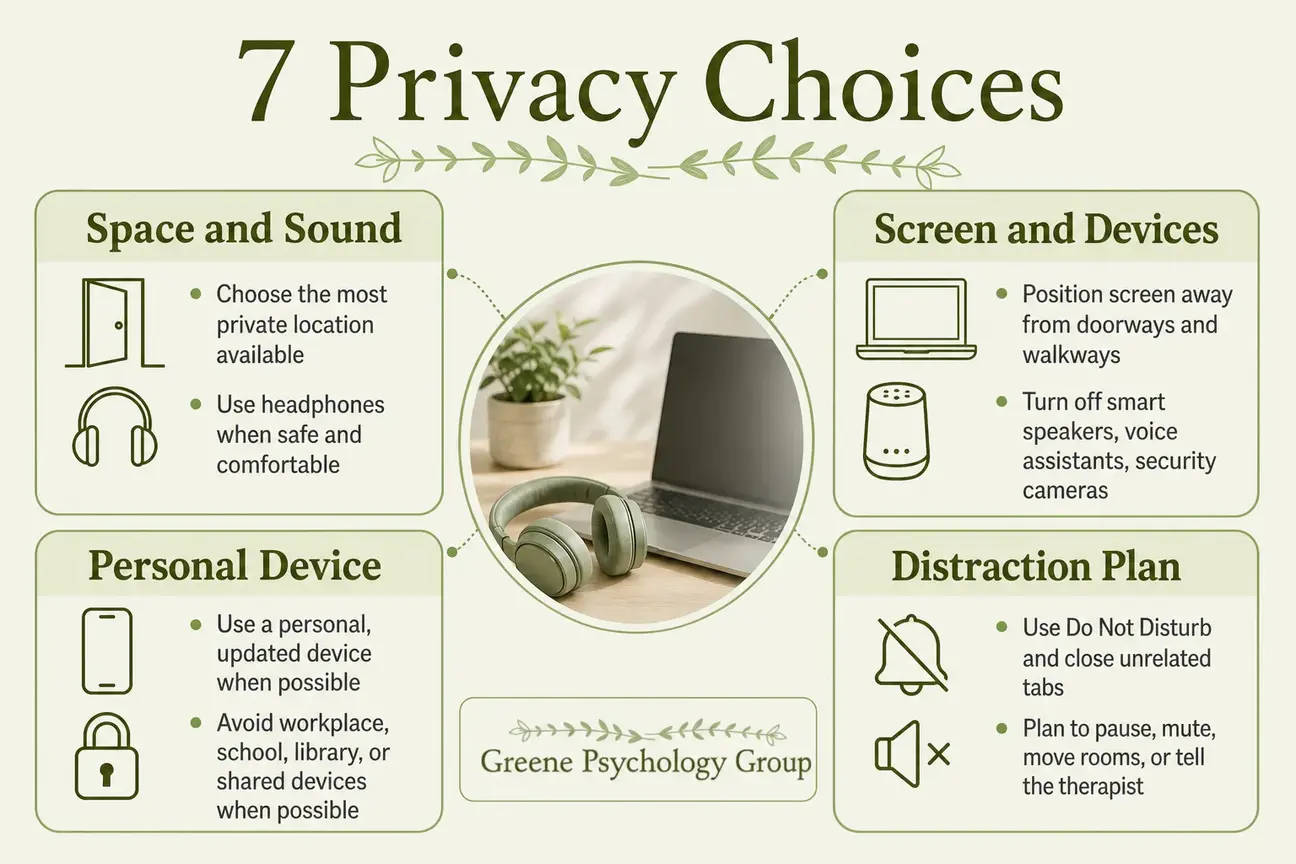
The following choices are not a promise of total privacy. They are practical steps that can lower the chance of being overheard, interrupted, or exposed through a device. Use the ones that fit the living situation, safety needs, and technology access.
1. Choose the most private location available
A room with a door is ideal when available. If not, look for a place where others are least likely to pass behind the screen or overhear voices. This might mean choosing a bedroom over a kitchen, a quiet corner over a shared room, or a time of day when the home is less busy.
2. Use headphones when safe and comfortable
Headphones reduce the chance that someone else hears the therapist, although they do not stop others from hearing the client’s side of the conversation. If headphones make it harder to notice a child, another responsibility, or a safety concern, talk with the therapist about what is realistic.
3. Position the screen carefully
Face the screen away from doorways, shared walkways, windows, cameras, and places where someone might glance over a shoulder. If a larger monitor is used, check whether the screen is reflected in a mirror or window.
4. Turn off unnecessary devices nearby
Move or disable smart speakers, voice assistants, home security cameras, and other devices that could overhear or record information. This is especially important when the session includes sensitive details about relationships, work, family, grief, trauma, or stress.
5. Use a personal, updated device when possible
A personal phone, tablet, or computer is usually preferable to a workplace, school, library, or shared device. Updates, passcodes, and strong passwords cannot remove every risk, but they can reduce avoidable exposure.
6. Silence distractions and previews
Use Do Not Disturb, close unrelated tabs, and turn off message previews so private information does not pop up on screen. This matters even when the client is not screen sharing, because notifications can still pull attention away from the session.
7. Plan what to do if privacy changes
Decide ahead of time that it is okay to pause, mute, turn off video, move rooms, or tell the therapist that someone entered. A simple plan can make interruptions feel less overwhelming and can help protect sensitive information.
The HHS telehealth guidance for patients recommends having a telehealth appointment in a private location and, when a private room is not available, considering headphones, avoiding speakerphone, and positioning the device so others cannot see the screen. Its patient guidance for telehealth privacy and security also recommends turning off nearby devices that may overhear or record information.
How to create private therapy at home without needing a perfect setup
Many people imagine private therapy at home as a quiet office with a door, good lighting, and no interruptions. When that kind of room is available, use it. When it is not, the same goal still applies: make the session feel safer, more contained, and less exposed.
Start with the room. A bedroom, spare room, parked and stationary car, or another quiet location may be more private than a kitchen, living room, shared porch, or open office. The space should be physically safe, climate-appropriate, and somewhere the client can sit without driving, multitasking, or monitoring another task closely.
Then think about sound. Headphones are often useful because they prevent the therapist’s voice from carrying into the room. A fan, white-noise machine, or closed door may also help, as long as that does not create safety concerns or make the space feel trapping.
Next, think about visibility. If someone walks by, can they see the therapist’s face, a name on screen, or a worksheet? Turn the device so the screen is not visible from a doorway or shared hallway. If a larger monitor is used, check whether it reflects in a window or mirror.
Finally, think about expectations. It is not necessary to tell household members why privacy is needed. A simple statement may be enough: “I have a private appointment from 2 to 3.” Private therapy at home often works better when privacy is treated as a normal appointment need, not something that requires a detailed explanation.
Teletherapy privacy in shared housing, parenting, and caregiving situations
Teletherapy privacy can feel more complicated when a client lives with roommates, a partner, children, parents, or other family members. A shared home does not automatically make online care impossible, but it does mean planning matters. The goal is to reduce exposure and be honest with the therapist about what is realistic.
If roommates are part of the household, consider whether there are times when the home is quieter. Scheduling when others are at work, class, or out of the house may help. If schedules are unpredictable, a neutral request for quiet time may be enough. The appointment does not need to be identified as therapy unless the client chooses to share that.
If parenting responsibilities overlap with a session, privacy may depend on another adult, a child’s nap, school, or an activity that keeps the child safely occupied. It is okay to tell the therapist if a child may interrupt. It is also okay to pause if a child needs attention. Therapy should not require ignoring safety or caregiving responsibilities.
If a caregiver, interpreter, partner, or support person may be present, talk about that in advance. That conversation helps clarify whether the person’s presence supports the session or changes what can be discussed.
For parents of teenagers, teletherapy privacy can raise additional questions. Teens and parents should ask the practice about consent and confidentiality rather than assuming how information will be shared. A teen may need enough privacy to speak honestly, while parents may still need to understand scheduling, safety, and treatment participation expectations.
One practical strategy is to create an interruption plan. Decide what will happen if someone enters: mute the microphone, turn off the camera, say “I need a moment,” move to another location, or type a brief message if the platform allows it. Teletherapy privacy does not require continuing to discuss sensitive material while someone else can hear.
Online therapy privacy for devices, Wi-Fi, and notifications
Online therapy privacy is not only about the room. It also depends on the device, network, applications, and notifications used for the appointment. A few minutes of preparation can reduce the chance that private information appears on screen or travels through a device outside the client’s control.
Use a personal device when possible. A work computer, employer-managed phone, school tablet, public computer, or library device may have monitoring policies, saved logins, shared access, or restrictions that are not obvious. If a shared device is the only option, tell the therapist and avoid saving sensitive documents or login information unnecessarily.
Update the operating system and telehealth application before the session if updates are available. Use a device passcode and strong, unique passwords. Enable encryption where available. These steps do not make technology risk-free, but they are basic ways to reduce avoidable exposure.
Avoid public Wi-Fi when possible. A home network or personal cellular connection may be preferable to a coffee shop, airport, workplace, or other public network. If the home connection is unstable, ask the therapist what to do if the video drops rather than switching quickly to an exposed setting.
Notifications deserve their own attention. A message preview can reveal names, health information, relationship conflict, or other private details while screen sharing or holding a device. Before the session, turn on Do Not Disturb, disable previews, close unrelated apps, and log out of accounts that are not needed.
Recording is another issue to handle carefully. Do not record a session unless the client and clinician have discussed it and any needed consent has been addressed. The therapist can explain the practice’s expectations and limits.
Online therapy privacy also includes everyday digital habits. Avoid taking screenshots, leaving session links open on shared screens, saving forms where others can see them, or sending detailed therapy information through an unencrypted channel. Small habits can make the overall setup more private.
Prepare for teletherapy with a simple checklist
Prepare for teletherapy in a calm, practical way. The goal is not to make the appointment feel like a technical exam. It is to reduce the most common disruptions so the client can focus more fully on the conversation.
| Before the session | Why it helps |
|---|---|
| Choose the quietest private space available. | Reduces the chance that someone overhears or interrupts. |
| Use headphones if safe and comfortable. | Keeps the therapist’s voice from being heard by others nearby. |
| Charge the device or plug it in. | Prevents the session from ending because of a low battery. |
| Test camera, microphone, and connection. | Gives time to fix simple technical issues before the appointment. |
| Turn on Do Not Disturb and hide message previews. | Limits private information appearing on the screen. |
| Close unrelated apps and browser tabs. | Reduces distractions and accidental sharing. |
| Move or turn off smart speakers and nearby cameras. | Limits devices that may overhear, record, or display information. |
| Keep backup instructions nearby. | Helps if the video link drops or reconnection is needed. |
This checklist can be especially useful before a first appointment. It is not necessary for every detail to be perfect. If something goes wrong, tell the therapist what happened and take a moment to reset.
Greene Psychology Group’s what to expect in your first session information may also be helpful for people who are new to therapy and wondering how confidentiality, questions, paperwork, and the first conversation may fit together.
Another way to prepare for teletherapy is to write down three practical details before the appointment: the private location, the backup plan if the connection drops, and the phrase to use if privacy changes. Keeping those details simple can make the start of the session feel less rushed.
Can a work break provide enough privacy?
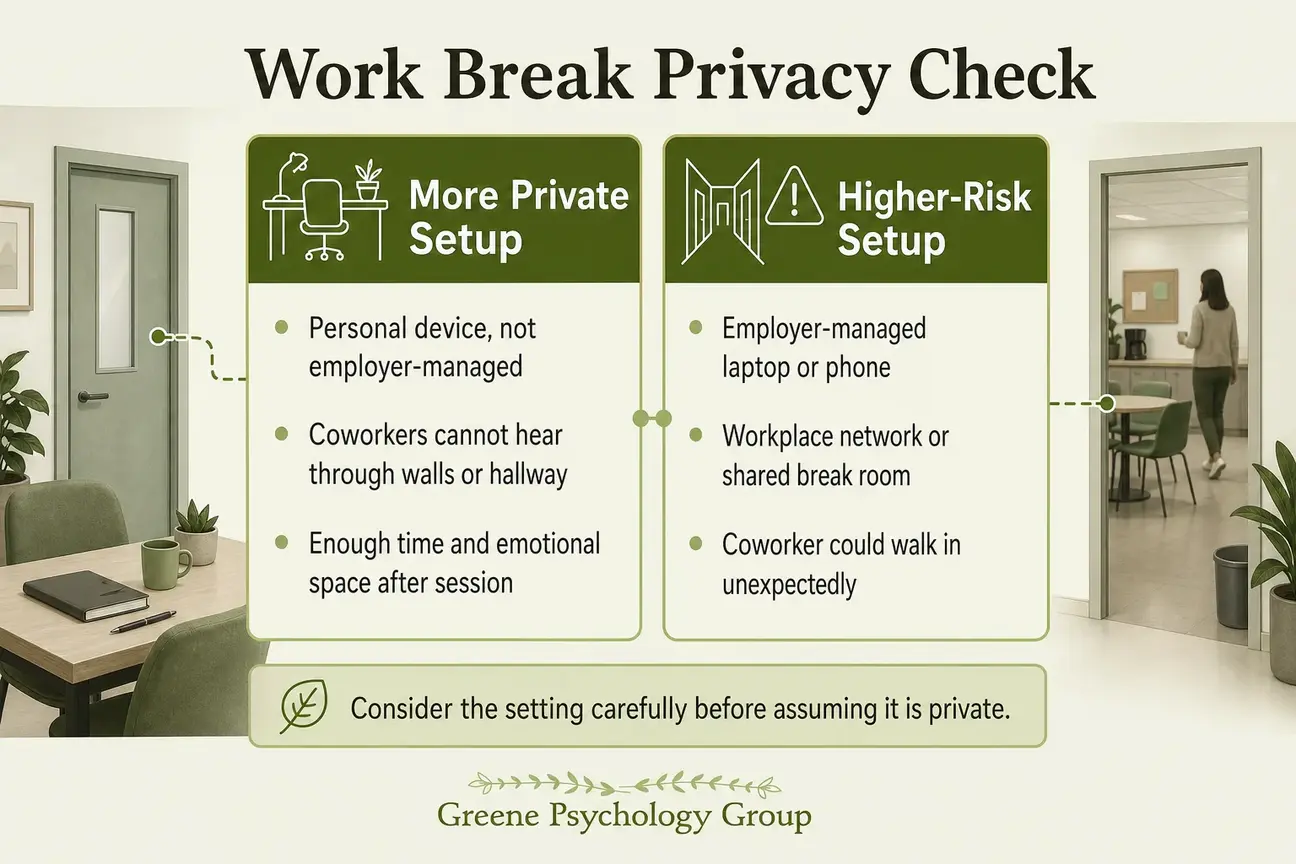
A work break can sound convenient, but it may not provide enough time, privacy, or emotional space for therapy. That does not mean therapy during a workday is always impossible. It means the setting should be considered carefully before assuming it is private.
Ask a few practical questions. Is the appointment happening on an employer-managed laptop or phone? Is the device connected to a workplace network? Can coworkers hear voices through a wall, hallway, or shared break room? Could someone walk in unexpectedly? Does the employer have policies about device monitoring or personal use?
A short break may also be emotionally difficult. Therapy can bring up stress, grief, conflict, anxiety, or decisions that need more than a few minutes to settle afterward. Some people can transition back to work easily after certain sessions. Others need time to breathe, write down a thought, or simply be quiet.
If a work break is the only option, consider whether a personal device, a private location, and a connection that is not public or workplace-managed are available. If those conditions are not possible, ask the therapist about alternatives. It is better to discuss online therapy privacy limits than to force a session in a setting where open conversation feels impossible.
What to do when privacy is not possible
Sometimes privacy is not available, even with planning. A family member may be home unexpectedly. A roommate’s meeting may end early. A child may need attention, the internet may drop, or the only available room may not be truly private. In those moments, there are still choices.
First, pause and assess. Can someone hear the conversation? Can they see the screen? Are they likely to monitor the device or connection? If the answer is yes, do not push through sensitive information.
Second, reduce exposure if it is safe. Put on headphones, move the screen, turn off video, mute the microphone, close a door, or move to another safe location. If a car is used, it should be parked, stationary, and safe; never attend a session while driving.
Third, tell the therapist. A client can say, “I do not have privacy right now,” or “Someone may be able to hear me.” A detailed explanation is not required. A skilled clinician can slow down, shift topics, or help decide whether continuing makes sense.
Fourth, use a backup plan. That may mean rescheduling, switching to a different format if appropriate, moving to a more private location, or focusing only on less sensitive topics. Private therapy at home may be workable most of the time and not workable every time.
Finally, prioritize safety. If being overheard could lead to intimidation, retaliation, coercion, or danger, do not disclose sensitive information in that setting. Let the therapist know that privacy is limited and ask for help making a safer communication plan.
How HIPAA, intake forms, and unencrypted email fit together
HIPAA provides an important legal framework for health information, but it is not the same thing as every communication method being equally secure. HHS describes HIPAA protections for medical records, health information, and billing information. Its patient telehealth guidance also gives practical privacy suggestions for people preparing for a virtual appointment.
Greene Psychology Group’s new client forms include intake paperwork and a confidentiality note. That paperwork explains the practice’s confidentiality limits. It is better to review those materials directly than to rely on a general blog article for legal or clinical details.
The practice’s contact form and email are unencrypted. If using the contact Greene Psychology Group page or emailing [email protected], share only contact details and a brief reason for reaching out. Do not include detailed health information, trauma history, diagnoses, medication information, family conflict details, or crisis information through the unencrypted form or email.
This distinction matters. A teletherapy platform used for a scheduled appointment is different from an email inbox or general contact form. If it is unclear what information belongs where, keep the first message simple and ask how to share more information appropriately.
Teletherapy privacy is strongest when the method fits the type of information being shared. Basic scheduling details may belong in a brief initial message. More personal information is usually better saved for the secure process the practice identifies for established care.
What NC clients should know before an online session
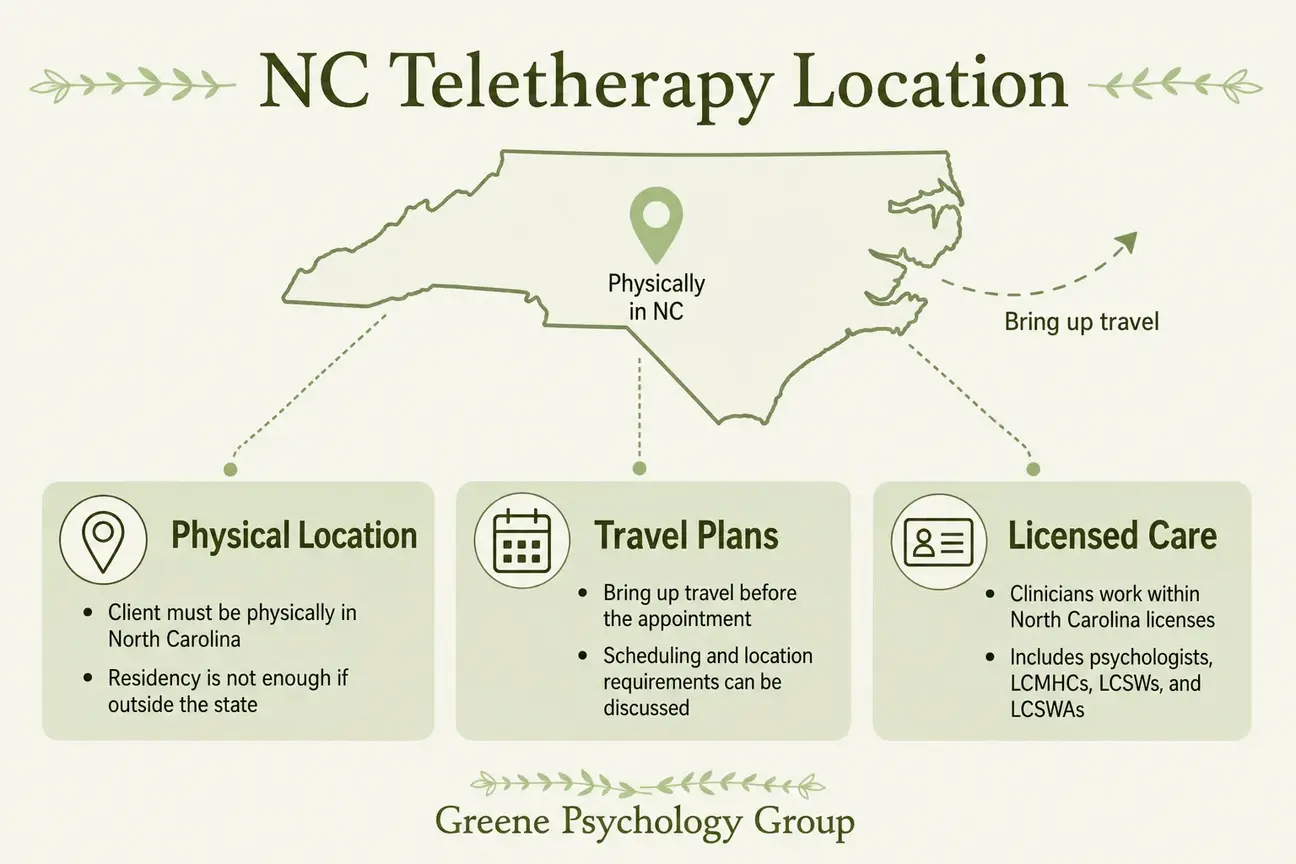
For Greene Psychology Group’s teletherapy service, the client must be physically in North Carolina during the session. Being a resident is not enough if the client is temporarily outside the state at the appointment time. If travel is planned, bring this up before the appointment so scheduling and location requirements can be discussed.
Clinicians work within their North Carolina licenses, including licensed psychologists, licensed clinical mental health counselors, licensed clinical social workers, and licensed clinical social worker associates under supervision. The North Carolina Psychology Board provides licensing information for psychologists, and the North Carolina Board of Licensed Clinical Mental Health Counselors provides licensing information for licensed clinical mental health counselors. Social workers and social worker associates are separate license types; this article is not a full licensing guide or a substitute for guidance from a licensing board, insurer, or clinician about a specific circumstance.
Greene Psychology Group has offices in Raleigh and Asheville and offers online sessions for people who are physically in the state during the session. If in-person care, online care, or uncertainty about format is part of the decision, ask about options when reaching out.
How to ask for help setting up teletherapy privacy
It is not necessary to solve every teletherapy privacy concern before contacting a therapy practice. It is reasonable to say that online therapy is of interest, but private space is limited, other people share the home, or a workday appointment may not be private enough.
If considering therapy with Greene Psychology Group, request an appointment, call 919-205-5339, or email [email protected]. Because the contact form and email are unencrypted, share only contact information, a brief reason for reaching out, whether Raleigh, Asheville, or online sessions are preferred, and insurance information. Do not send detailed health information through the form or email.
The practice is in network with most BCBS and Aetna plans, out of network for most other plans, and accepts self-pay clients. Benefits should be confirmed with the insurer and the practice. If uninsured or self-pay, review insurance and payment information and the Good Faith Estimate information without sending sensitive details by email.
When online therapy may not be the right format for a particular session
Online therapy can be convenient, but it is not always the safest or most private format for every appointment. A session may need to be rescheduled or handled differently if someone can overhear, if the device is being monitored, if open conversation is not possible, or if the location does not feel emotionally safe.
It may also be harder to use teletherapy for a particular conversation if privacy is needed from a partner, parent, roommate, employer, or another person who controls the space or device. In that situation, the priority is not to disclose more. The priority is to let the clinician know that privacy is limited and create a safer plan.
Online therapy is not a crisis service. If someone is in immediate danger, needs emergency support, or cannot stay safe, emergency and crisis resources are more appropriate than waiting for a scheduled therapy appointment.
A steady way to think about privacy before the next appointment
Private online therapy is not about creating a flawless setting. It is about making thoughtful choices before the session and speaking up when the setting changes. A closed door, headphones, a personal device, muted notifications, and a backup plan can make a meaningful difference.
If trying to prepare for teletherapy in a shared home, during a busy workweek, or while caring for others, be honest with the therapist about the limits. Therapy can often adapt, but it should not require sensitive disclosure when someone else can hear, watch, or monitor the conversation.
Private therapy at home and online therapy privacy both depend on realistic planning. Teletherapy privacy may never be perfect, but it can often be improved with a clearer room plan, safer device habits, and a willingness to pause when the setting changes.
This article is for general education and isn't a substitute for diagnosis or treatment from a licensed professional. If you are in crisis, call or text 988 or call 911.
If there is immediate danger, call 911 or go to the nearest emergency room. For a mental-health or suicidal crisis, call or text 988; SAMHSA explains the 988 service on its 988 Suicide and Crisis Lifeline page.
Frequently Asked Questions
Is online therapy private?
Online therapy is designed to protect health information, and HIPAA generally applies to covered telehealth care. Privacy also depends on the room, device, network, notifications, and who is nearby. No home setting can ensure that another person will not overhear if private space is limited.
What should I do if I share a home with roommates or family?
Choose a room with a door if possible, use headphones, silence notifications, and position the screen away from shared areas. Let the therapist know if someone may enter or overhear. If privacy cannot be maintained, it is okay to pause, move, reschedule, or ask about another plan.
Can I have online therapy in my parked car?
A parked car may be an option only if it is safe, stationary, climate-appropriate, private, and unlikely to be overheard. Never attend therapy while driving. Consider battery power, connection quality, visibility, temperature, and whether another location would be safer.
Can I attend teletherapy during a work break?
Sometimes, but a work break may not provide enough privacy, time, or emotional space. Avoid workplace devices and networks when possible, and consider whether coworkers, monitoring policies, or shared rooms could affect privacy. If the setup is uncertain, ask the therapist about alternatives.
Should I use headphones for an online therapy session?
Headphones can help because they keep the therapist’s voice from being heard by others nearby. They do not stop others from hearing the client’s side of the conversation or seeing the screen, so it still helps to choose the most private location available.
What if someone walks in during my session?
Pause, mute the microphone, turn off video, move to another location, or tell the therapist that privacy has changed. Sensitive information does not need to be discussed while another person can hear. Planning a simple interruption signal ahead of time can help.
Can I use email or the contact form to explain everything before therapy?
Keep initial contact brief. Greene Psychology Group’s contact form and email are unencrypted, so share only contact details and a short reason for reaching out. Do not send detailed health information, trauma history, diagnoses, medication details, or crisis information through those channels.
Do I have to be in North Carolina for online therapy with Greene Psychology Group?
Yes. For Greene Psychology Group’s online therapy service, the client must be physically in North Carolina during the session. Being a resident is not enough if the client is temporarily outside the state at the appointment time.